PDF to JPG or PNG: Choose the Right Image Export Settings
Use PDF to Image when a PDF page needs to become a normal image: a receipt image for upload, a contract page for quick review, a slide thumbnail, or a page preview for another app. This tool is for showing a page as a picture. It is not for editing the PDF text.
JPG and PNG are both useful, but they solve different problems. JPG is smaller and works well for scanned pages or photos. PNG is better for text, tables, UI screenshots, diagrams, and anything with sharp lines.
Export a Test Page First
After upload, pick one page that represents the file: a page with small text, a table, a signature, or the kind of layout you actually care about. Export that page first instead of converting the whole PDF immediately.
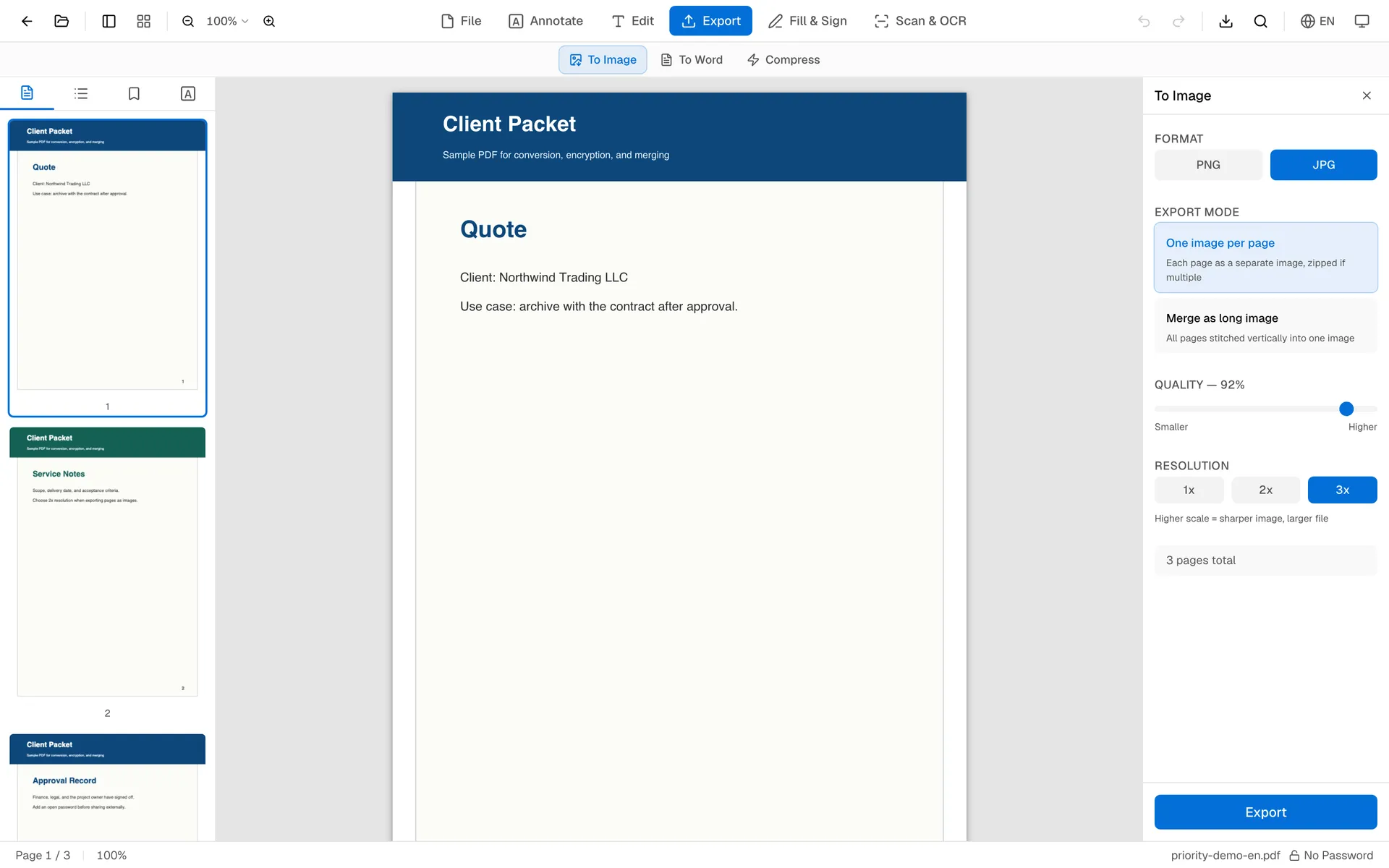
The settings panel is shown below. Use 1x for quick previews, 2x for normal readable text, and 3x for design review, printing checks, or pages with tiny numbers. Higher scale looks sharper, but it also creates larger image files.
Check the Image Quality
Open the exported image, look at it at normal size, then zoom in once. If the text is readable, lines are clean, and the file size is acceptable, use the same settings for the rest of the PDF.
Once a page becomes JPG or PNG, selectable text, links, forms, and search are gone. Keep the original PDF if you may need to copy text or edit the document later.
Separate Images or One Long Image
Use one image per page when page boundaries matter, especially for documents, receipts, and forms. Use one long image for a scrolling preview, a social post, or a quick visual review.
If you later need to turn exported images back into one PDF, use Image to PDF. If the original file is too large before export, try Compress PDF.
FAQ
Is JPG or PNG better for PDF pages?
JPG is usually smaller. PNG is usually sharper for text and flat graphics.
Can I export every page at once?
Yes. Export one image per page and download the result.
Does converting to image keep selectable text?
No. JPG and PNG are image formats, so text becomes pixels. Keep the original PDF if you need searchable text later.
Check one exported image before sending the whole batch. A quick zoom test catches most quality mistakes.